Rock - Photogrammetry based Environment Texture
With this material I improved the shadow removal part in my workflow. I am surprised how good results I got with this approach. I used baked Ambient Occlusion as a mask and along with the equalised albedo I also used shifted/offset with the 'Transform 2D' node base map.
It gave me quality I wasn't able to achieve with my previous approach.
To remove bright spot I used 'patch' node. So far this is the best way without any quality loss I have found to delight the albedo.
I am sure there are materials when this approach wont work very well but for this type of surface it works really good.
Also as I mentioned with the previous material, this time I baked the height map using manually positioned flat plane. The result I got with the decimated one seems to be a bit better and a bit more responsive. I used ZBrush to present the difference where I plugged heightmap as a brush alpha and used as stamp on highpoly planes. More info is in images description.


This is my photogrammetry workflow - still experimenting with 'Artomatix' and replaced Photoscan with Metashape (more details regarding to my workflow at: https://www.artstation.com/artwork/K0PYG)

Zbrush - lowpoly covetage over the highpoly - lowpoly is a simple 3D plane positioned manually for baking

Artomatix - graph I used to remove seams and fix main glitches.

This is improved way to remove shadows. I used baked AO as a mask and combined it together with equalised albedo, but since the details in shadow were not good enough I bring them using additional offset with the Transform 2D node albedo.
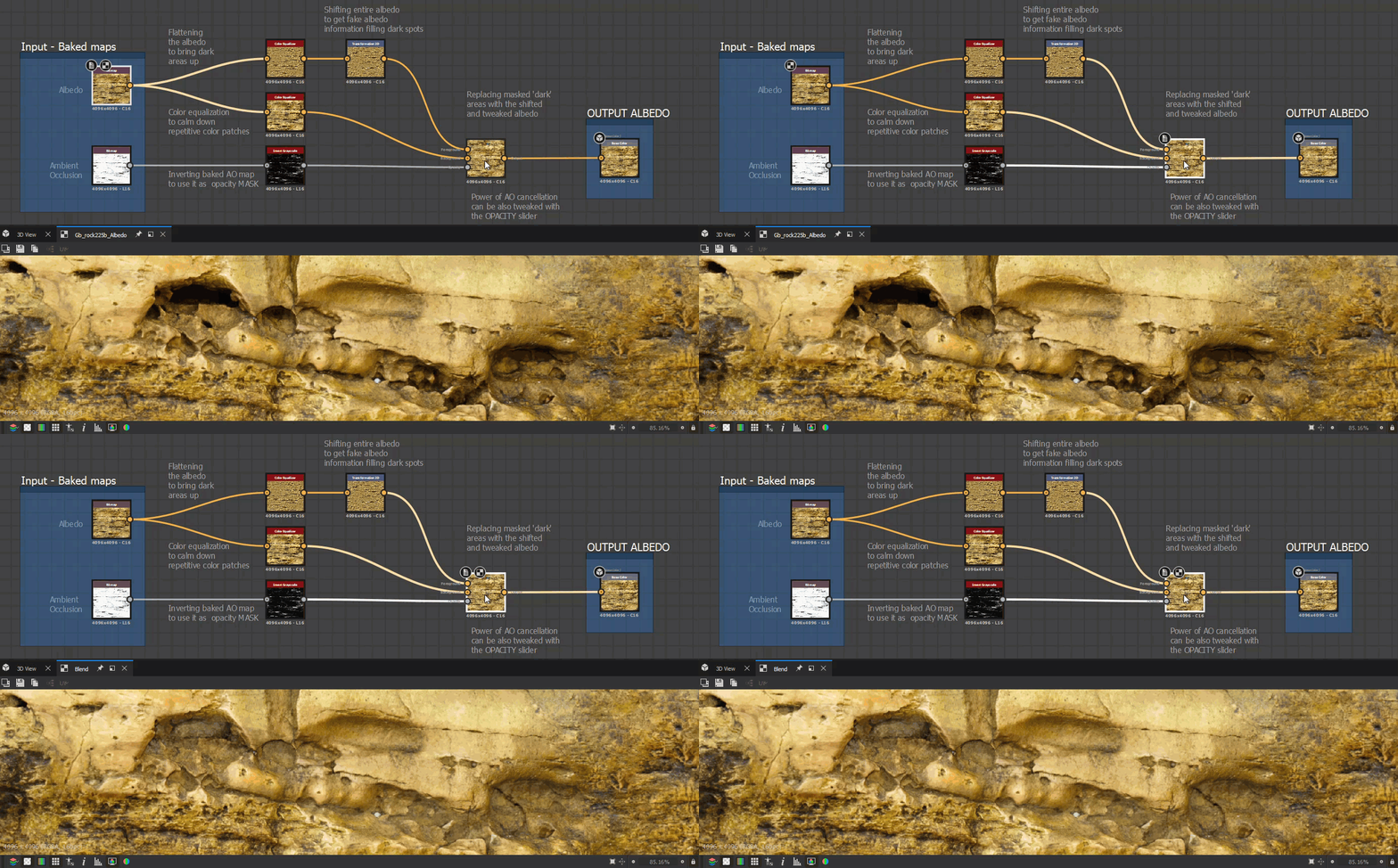
Shadow removal - before and after. With blending set to 75%

Highlight removal with Patch node - before and after

I also as promised processed another test: the height map response regarding to lowpoly type.
To the left the heightmap based on decimated lowpoly model (previous material). To the right the heightmap generated by using flat plane (current material).

And the height response test presented on animated gif. So far the counclusion is that the heightmap baked using decimated model has the higher quality depth and for surfaces like this one makes more sense.