Gravel - Photogrammetry based Environment Texture
A dirty and dusty, glued to the ground :) gravel I captured a while ago. Since it was covered in loads of street trash, I marked it with a mask and used ArtEngine's AI to get rid of it.
To create this material I followed my standard workflow, which can be found on my youtube channel:
https://www.youtube.com/c/GrzegorzBaranArt
The has been added to my Material Library as 'gb_rocks267'
https://gum.co/WJAQy
Cheers!


PBR preview: Albedo / Normal / Metalness/ Roughness / AmbientOcclusion
Marmoset Toolbag 4 - tiling preview video

Source location - surface coverage
A short video to present path I covered to scan this surface

Source location - another shot with the surface coverage. As you can see I used rulers to mark the area, but I also captured them to get them into 3D scene so I can use them as a reference to define the low poly model size/coverage

Source location - image of original's surface height details with my shoe used as scale reference

PhotoLab4 - before/after I tweaked images for reconstruction. I reduced power of shadows using BLACKS slider, reduced noise, tweaked sharpness, remove vignietting etc.
You can find camera settings in top left corner.

Metashape - these are cameras positions used for photogrammetry based surface reconstruction. To capture this surface I took 232 images.

Metashape - close up for geometry details of 100mln poly heavy mesh

Metashape - geometry details with 16k texture used to cary albedo applied

Metashape - shot I took to compare the difference in color data if I would use vertices to carry color information. Bare in mind this is based on 100mln poly heavy mesh

Zbrush - the low poly model positioned over the high poly model for texture baking. I used rulers as a scale reference to make sure the coverage is correct.

Substance Designer - these are settings I used to bake PBR texture-set from the highpoly model
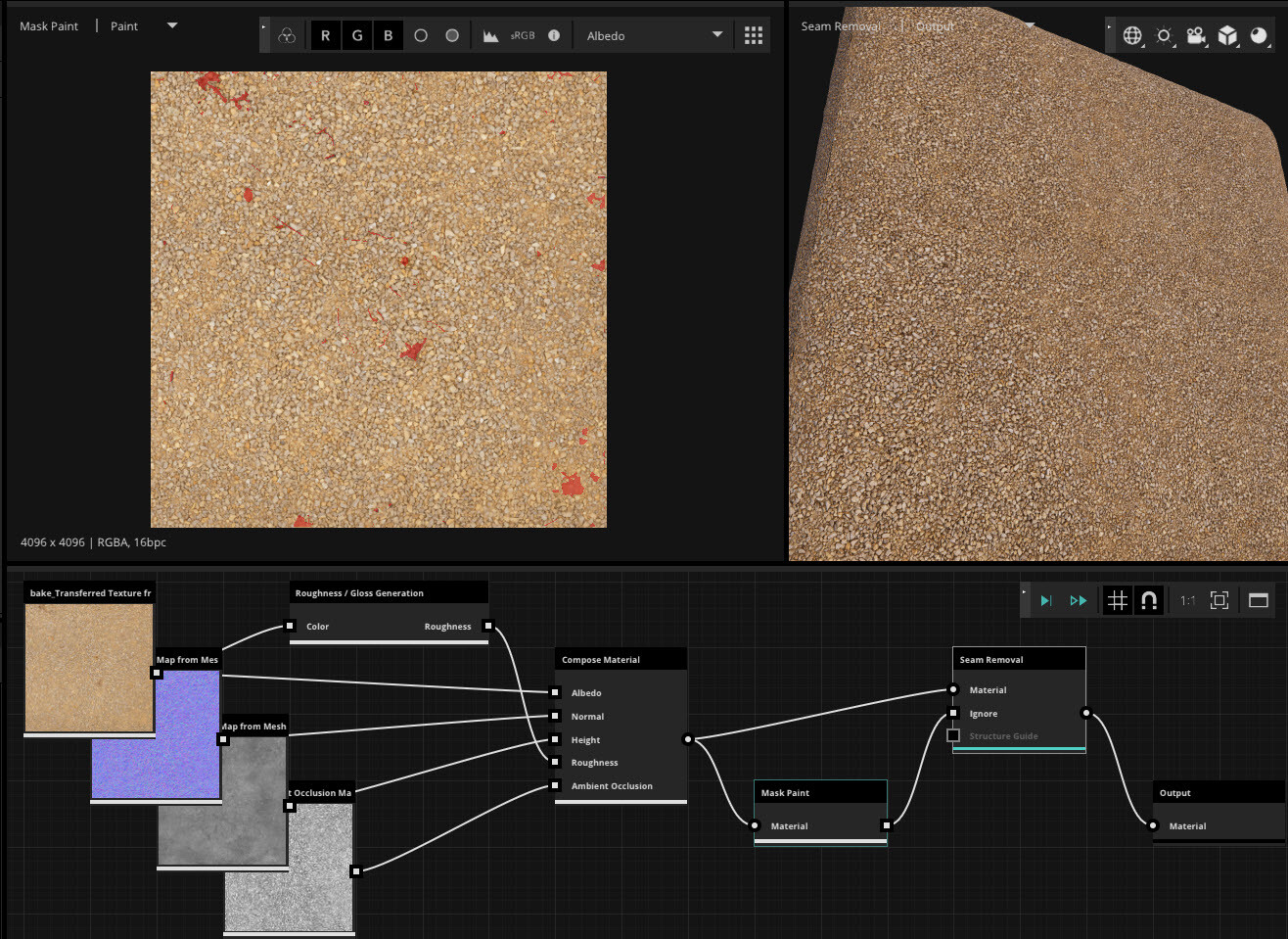
Unity ArtEngine - node setup I used for auto seam removal with the AI and surface correction. With the mask I marked areas and glitches I wanted AI to rebuild.

Unity ArtEngine - close up for things I masked out for the AI. As you can see the surface was covered with a weird kind of trash coming from the street nearby

Unity ArtEngine - close up for things I masked out for the AI. This time I used a 'height map' as a background to locate glitches. With the ArtEngine you can switch between background channels by hitting key 'C'

The material and texture set has been added to my material's library:
https://gum.co/WJAQy
as 'gb_gravel268'