Gravel - Photogrammetry based Environment Texture
I realised that I loose about 25% of scanned information while trying to automate tiling process with Substance Designer. Because auto tile is stupid as fuck I also loose quality on transition area. So, until I find out better and more clever solution which will be less destructive, it will be better just to use brush and tile these texture manually to have full control over it
There are two approaches I considered. One is Photoshop and second one, Substance Painter based. The first one basically needs to clone textures, offset each one, group them, and cover transition area with mask. It is old and proven way, but it is not fun as the other one. Second approach with Substance Painter seems to be more fun and efficient cause one can allow for realtime preview for entire material.
Textures were initially baked from 18mln poly Highpoly in SD.
Still need to do more tests but I think finally I managed to define main photogrammetry pipeline which makes sense for me and I am happy with.


Photoscan: 18mln polygons mesh generated from 18 images

Zbrush: Topology Brush based Lowpoly model drawn on Highpoly
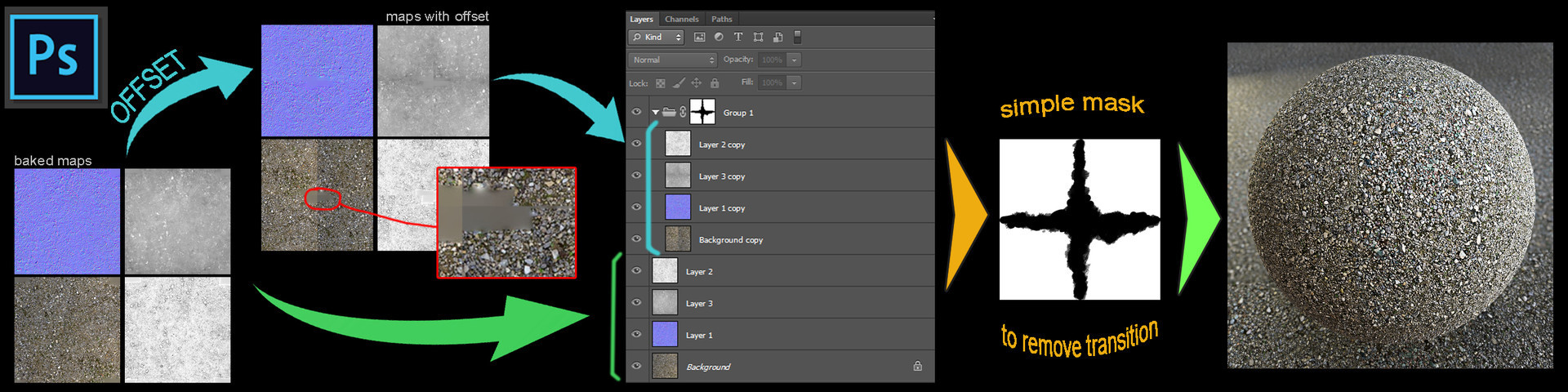
Photoshop - aproach when we use offset and cover difference with mask applied to layer group.

Substance Painter - approach when we offset texture to 0.5 using value and use STAMP to fix/cover seams

Both approaches needs to be tweaked after in Substance Designer.

Texture preview
Texture Live Preview