Rock - Photogrammetry based Environment Texture
I did small change in my current workflow - I removed 'sharpen' node from substance graph - used to tweak albedo - and I replaced that part of process with Photoshop and it's SHARPEN MASK filter - as it works much better.
I also noticed that I pay really a lot of attention to HISTOGRAM while tweaking values in Designer. It is very important to understand how it works and use it all the time as it is really powerful source of information. I adding page from tutorial I am working on as I covered that part already there and someone might find it useful.


My current workflow

Source location - I took 41 shots to capture that surface - was enough to generate 23mln poly mesh

Photoscan - camera position preview
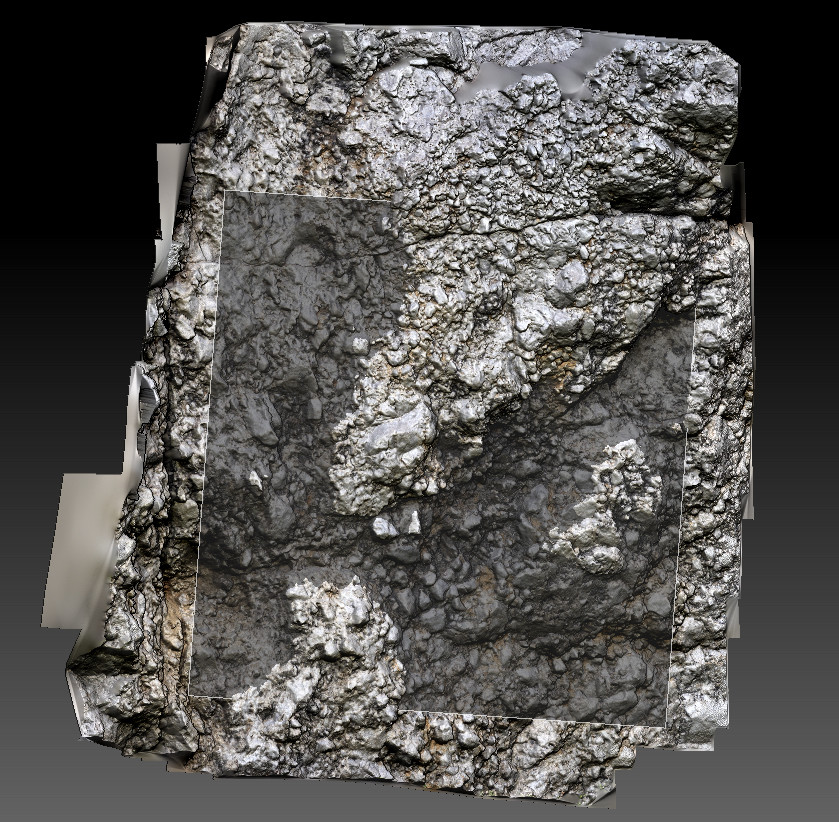
Zbrush - lowpoly positioning over highpoly (23 mln poly)

Seam removal and small tweaks in Painter - that one took 2mins :) as there was nothing really to tweak and seam was almost invisible

Final processing with substance designer - graph preview

page from tutorial I am working on about histogram. Imo it is very important to understand how to read it as it is really powerful and useful source of information for photogrammetry.

PBR texture preview
1k texture live preview