Concrete - Photogrammetry based Environment Texture
Concrete surface scan which I used to test how 'structure guide' mask works in Artomatix. This mask gave AI info about surface flow and in result it followed horizontal structural lines. Without this mask Artomatix tiled texture properly but totally random. Because scanned surface didnt cover 1.8x1.8 of real surface, I used Ignore mask and let AI filled missing data. Artomatix did a job quite well but not perfect. As you can see it didn't guess as human would do and missed some horizontal lines but I am pretty happy with the result anyway as this is something definitely good enough and since it is very solid base, it can be tweaked easily in Substance Painter manually if need.


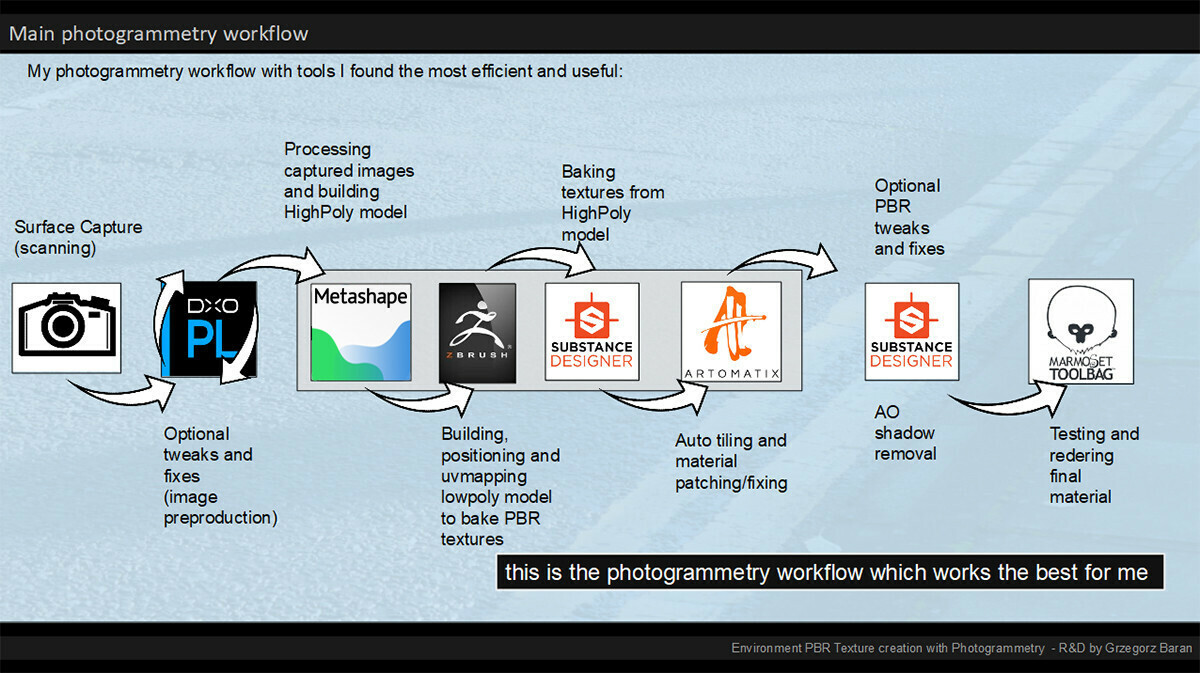
This is my photogrammetry workflow - still experimenting with 'Artomatix' and replaced Photoscan with Metashape (more details regarding to my workflow at: https://www.artstation.com/artwork/K0PYG).

The source - to capture this surface I took 33 images + 1 for color calibration.
The focal length was set to 50mm and aperture to 16
As a scale reference I used plastic folded ruler placed on the ground at the bottom of the captured wall.

The Source - surface details with my shoe used as scale reference

The reference image with the Color Checker included - used to calibrate color and tweak white balance in PhotoLab2

Metashape reconstruction preview - blue planes marks the camera's position during the capture

ZBrush - lowpoly coverage over highpoly scan - I covered a bit more to entire surface coverage hoping Artomatix AI will fill missing surface data in during seam removal.

Artomatix Artengine in action - The graph I used to remove seam and reconstruct missing data. In this case I am previewing the IGNORE mask which I used to mark areas AI should ignore and do a guess based on left data.

Artomatix in actin again - this time I am previewing a mask I did to mark the surface structure as I wanted AI to keep horizontal lines and don't mess with their placement. As you can see the result is quite good.. entire process took just a while.
The final PBR material preview in 1k resolution